Contact Profile: Wrong Number
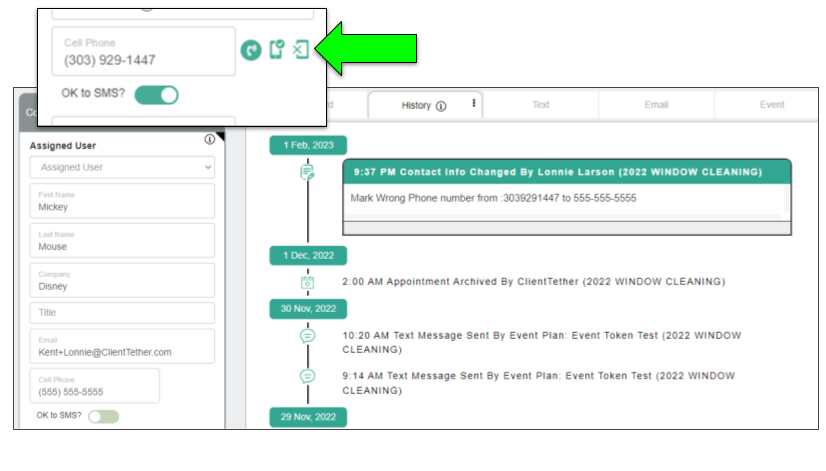
February 2, 2023When working in the Contact Profile, and it is discovered that the phone number is wrong, there is a one-click button to handle this.
When the Wrong Number button is click the system will:
– replace the current phone number with 555-555-5555 and
– generate a History Note with the original number and the replaced number
– turn off OK to SMS ?
Notifications: Restore form Archive
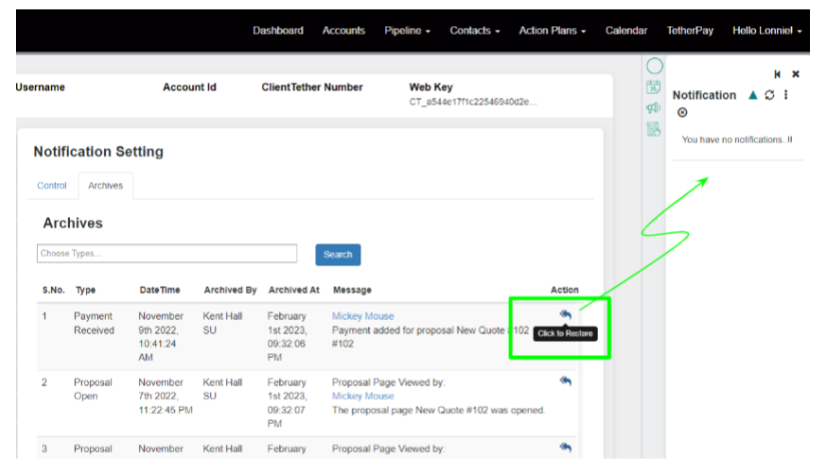
February 2, 2023If a Notification has been archived, it can be restored to the active list by clicking the Restore Icon found in the Notification Settings Archive List
Notifications: Payment Entered vs Received
February 2, 2023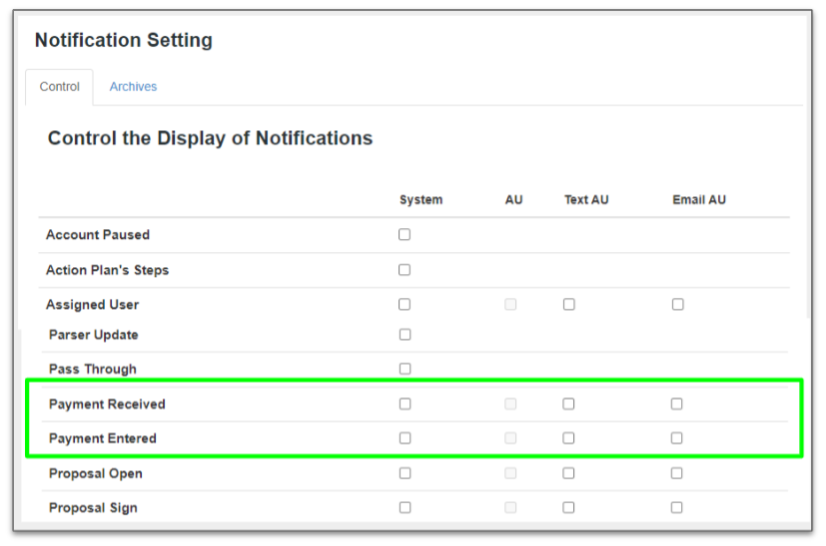
Payment Received occurs when the Contacts pays an invoice.
Payment Entered occurs when a User inputs a payment from the Proposal Overview Tab
Proposal Settings – Share Quote Type
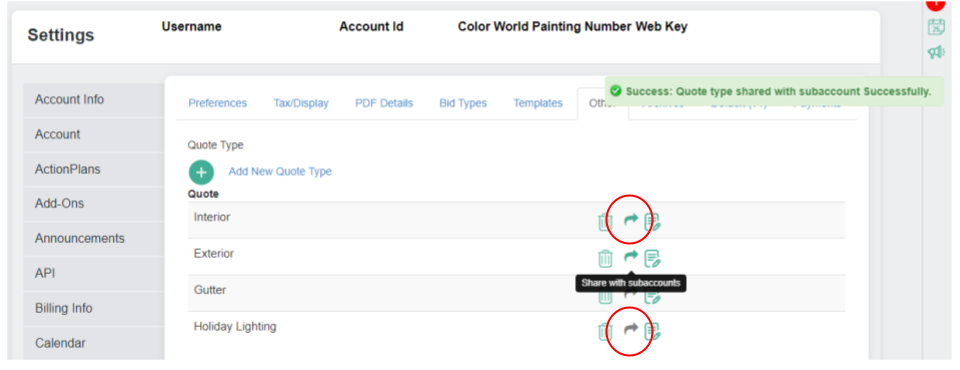
January 5, 2023You can choose to share “Quote Types” down your organizational structure.
Simply go to the Other tab under Proposal Settings and click any Gray Arrow. That will tell the system to share that Quote Type with subaccounts. A green arrow means that the Quote Type has already been shared. (See image below.)
Support Questions
December 21, 2022Existing Customer should refer to the lower left corner of your ClientTether pages, there you will find the name, email and phone number for you first line of Support.

Existing customers you can also call: +1 801-823-4737.
For pre-sales questions please call: +1 385-332-8144.
SendJim Add-on
December 13, 2022SendJim is a direct mail delivery system that makes Direct Mail a breeze. And now it is custom Add-on available in your ClientTether. BEFORE using this feature in ClientTether you must have an account with SendJim also.
To learn more please watch this video:
Proposals: Duplicate Bid Type and Line Items
December 8, 2022
The duplicate options allows the User to quickly add similar Worksheet elements like whole Bid Types or individual Line Items.
Duplicating a Bid Type puts the new Bid Type immediately below the current Bid Type with all the associated line items.
Duplicating a Line Item puts the new item immediately below the current line item within the current Bid Type.
Proposals: Add Templates to Worksheets
December 8, 2022A Template can be used to start a new Proposal or to add to an existing Proposal.
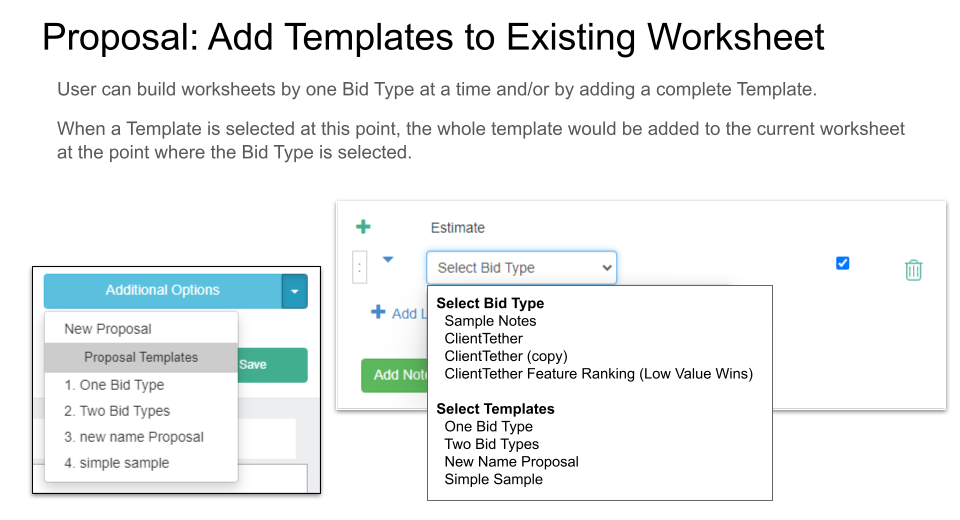
As you can see in the image above, Templates are shown on the Bit Type dropdown as well as the create New Proposal menu.
Proposals: Field Type Calculation, Rounding
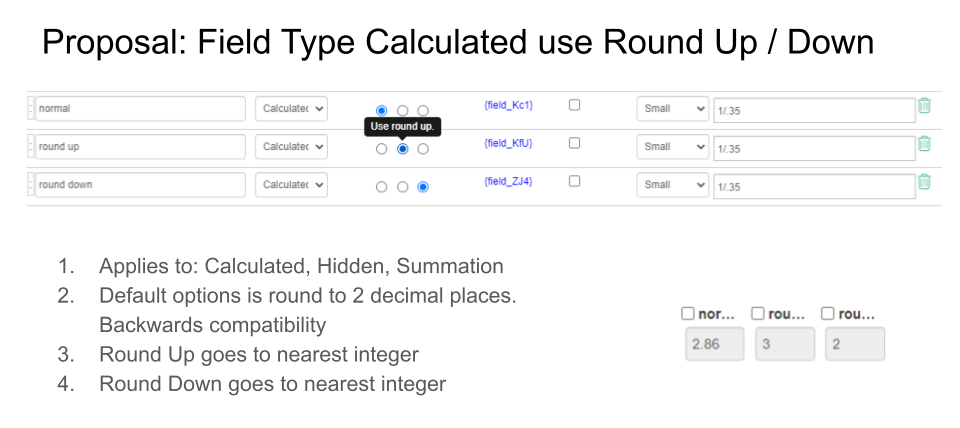
December 8, 2022There are three types of Calculated fields: Calculation, Hidden and Summation. All three have the same rounding options explained below.
Round is the default option and it will properly round to two decimal places.
The second decimal place will be rounded down if the third place decimal is a 0 – 4.
The second decimal place will be rounded up if the third place decimal is a 5 – 9.
The Round Up option on a Calculated field will round up the calculated value to the nearest interger.
The Round Down option on a Calculated field will round down the calculated value to the nearest integer.
Set the rounding options in the Proposal Editor and it will be applied when that line item is selected on the Worksheet.
Recommendations and Best Practices for Maintaining a Positive Caller Reputation
November 30, 2022Maintaining consumer trust in the voice communication channel is critical. Consumers expect to receive wanted and personalized communications, while being protected from spam and unwanted calls. This guide provides updated best practices for maintaining a positive caller reputation.
Why does caller reputation matter?
Throughout the industry, there are continued and increasing efforts to reduce unwanted calls to consumers. These efforts can often lead to calls being screened or blocked. This can make it difficult for your legitimate business calls to reach customers and get answered. This is a list of recommendations and best practices to maintain a positive caller reputation, minimize being blocked or flagged as spam, and improve answer rates.
Telemarketing and Advertising Requirements
If you use Voice Services to place telemarketing or advertising voice calls, you will be required to:
- Obtain the consumers prior consent, as required by applicable law or regulation
- At the beginning of the call, clearly and conspicuously disclosing the purpose of the voice call and identify and accurately represent yourself, or your organization, as applicable;
- It is advisable to consult with your legal council for guidance with applicable laws and regulations related to telemarketing and advertising voice calls in your jurisdiction and your end users jurisdiction.
Positive Caller Reputation Basic Do’s and Don’ts
- Comply with all “Do Not Call” lists (e.g. https://www.donotcall.gov/ US Only), and other Telephone Consumer Protection Act (TCPA) Act 47 U.S.C. § 227 requirements (US Only).
- Keep your calling list(s) up to date, and remove numbers that don’t connect.
- Unreasonable answer and completion rates in accordance compared with normal use rates are often associated with spammers, so you don’t want to be calling unassigned or disconnected numbers regularly, and no random “wardialing”.
- Provide a number and/or contact information that called parties can use to report alleged violations. This is often done on websites, in emails and in first texts.
- Be aware and mindful of carrier practices related to intra exchange calls and legitimate code-prefixes for the location phone number in the “from” number, aka “neighbor” calls. Purchase a local number for only your true location. Spoofing this method is often used by spam callers. Network operator call screening algorithms are aggressively monitoring for this behavior.
Be consistent in your phone number usage
- Avoid using the same telephone number for multiple purposes (i.e. marketing, surveys, and support callbacks). To help reduce the likelihood of your calls being categorized as spam, we recommend aligning the context and content of your calls over a specific phone number throughout the life of your campaign. Phone numbers that have been reassigned for other purposes should wait at least 45 days before being reintroduced in a new campaign.
Be consistent in your outbound call volume
- If your use case allows it, attempt to maintain a regular traffic volume, without unusual spiking.
- Gradually ramp-up new campaign call volume incrementally over time, and avoid going from zero to full volume in a short period of time..
- Calls for legitimate business purposes should not be too frequent, or outside of common working hours. What is deemed too frequent varies by use case. For example, the Fair Debt Collection Practices Act notes that 8 calls to a recipient phone number within seven consecutive days is considered to be harassment and the caller can be fined. For some products/services customers can specify how many times they want to be contacted and their preferred contact channels.
US ONLY: If you are following all best practices and still being labeled as spam, your best recourse will be to add your numbers to https://freecallerregistry.com/fcr. Here, you can register your phone numbers for legitimate calls to the major US cellular providers. Please note, this process can take a few weeks to complete.
Important: Free Caller Registry submissions help reduce spam/scam labeling, but they’re not permanent. Re-submit every 6 months or use a vendor that monitors and refreshes automatically.