How to Fix: Outbound calls blocked or labeled as spam or scam likely
November 30, 2022Table of Contents
- What is a Nuisance Call Label?
- How do I remove a nuisance label from my Twilio phone number?
- Will registering my number resolve mislabeled calls?
- Should I register numbers I just purchased?
What is a nuisance call label?
Customers who conduct legitimate voice business may notice that their outbound calls are getting marked with nuisance call labels, such as ‘Scam Likely’, ‘Spam’, ‘Fraud Risk’, ‘Robo Call’ or some variant based on an app, device or network. This can be frustrating, and could result in outbound calls going unanswered or even getting blocked.
How do I remove a nuisance label from my Twilio phone number?
Here are a few steps you can take to address Nuisance labels on your phone number.
- US Numbers: Register your US numbers with the FCC. The FCC established this free registry site, https://www.freecallerregistry.com/fcr/, which covers the main analytic companies that support major US wireless carriers that can remove a negative label on a call.
- Important: Free Caller Registry submissions help reduce spam/scam labeling, but they’re not permanent. Re-submit every 6 months or use a vendor that monitors and refreshes automatically.
- International Numbers: At this time Twilio is not able to assist with removing nuisance labels from international numbers. Please reach out to the terminating carrier that is marking your calls as spam and work with them to register your number or correct the nuisance label.
- Updating CNAM on your phone numbers may increase the likelihood of answered calls by providing accurate caller information. THIS FEATURE IS IN BETA – release date is TBD.
- CNAM stands for Caller ID Name. CNAM is a feature in the United States public telephone network that identifies an incoming caller by a personal or business name associated with the originating phone number. You can also choose to remove any CNAM currently assigned to a number. This is helpful when you purchase a new number as CNAMs are not automatically removed when users release ownership of a number.
- CNAM will not remove a Nuisance label, but may increase answer rates due to the proper display of caller information applied to the call.
Will registering my number resolve mislabeled calls?
While number registration often resolves mislabeling, it is not a whitelist or a guarantee of avoiding mislabeled calls in the future. Registered numbers can still be flagged again if certain call patterns are detected, inconsistent with registered usage or if consumers submit spam or fraud reports against the number.
Therefore, we recommend the following key practices:
- Remain consistent in your calling behavior by keeping track of unusual spikes in traffic volumes.
- Ensure that you have complied with all relevant TCPA laws, FCC regulations, and our Acceptable Use Policy.
- Follow our Recommendations and Best Practices for Maintaining a Positive Caller Reputation guide
Should I register numbers I just purchased?
Yes, nuisance labels are not automatically removed from a number when the previous owner releases them. It is a best practice to register any newly purchased numbers.
How do I know if this is what I need to do?
In support we hear it described this way, “…when I click to call I am not able to connect to the client. I hear a message like: ‘the number provided was invalid’. Then I called from my personal phone and I was able to connect with the client”.
In this case, the carrier for your client’s phone has decided that the system number is a spam caller, and they have blocked your call by playing a message, ‘…number invalid’. It is time to register your system phone number as instructed above.
Proposal Line Item Note Type
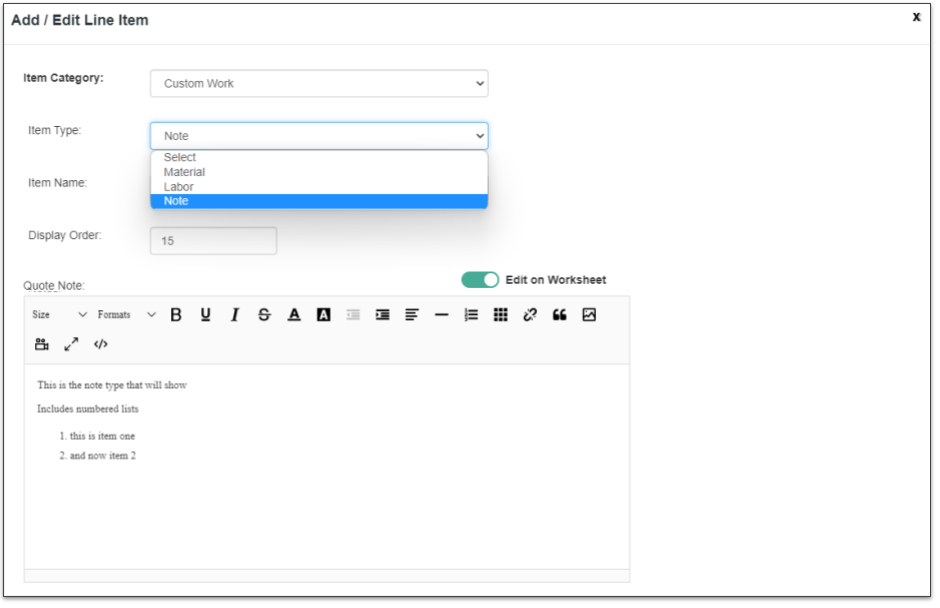
November 17, 2022There are three Line Item Type selections: Labor, Materials and Note.
Synchronize to Google Calendar
November 17, 2022Users can choose to sync their ClientTether Calendar to their Google Calendar.
Proposal Line Item Default Control to Display on Quote
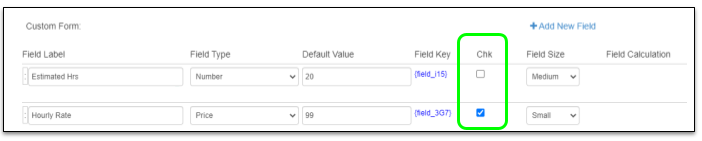
November 16, 2022You can set the Default arrangement to Display a field on the Quote
Lead Routing updated with Assign User
November 16, 2022If a lead is left in the current account because no criteria is define that would send the lead to a sub account, then you can also assign a User at the same time.
Pipeline
November 16, 2022Pipeline is a visual representation of Sales Cycles in Action.
Recent updates have improved the functionality of the Pipeline.
Return Email with copy
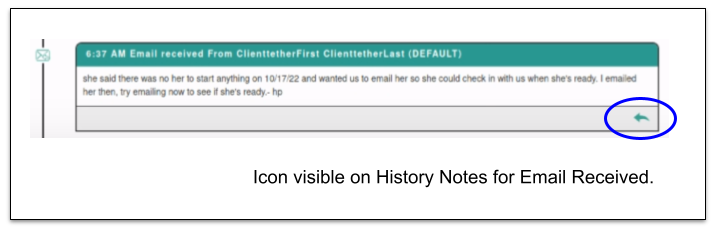
November 16, 2022From History Notes you are able to see some emails that have been returned to you. In the bottom right you are able to click on the icon to reply with a copy of the email in the bottom.
Event Invites
November 16, 2022When an Event Email Invite is sent, the recipient is able to add the appointment to their calendar via a link near the bottom of the email. A Google and Outlook link is provided. Additionally an iCal download file. is attached.
Event updates when Contact’s Info changes
November 2, 2022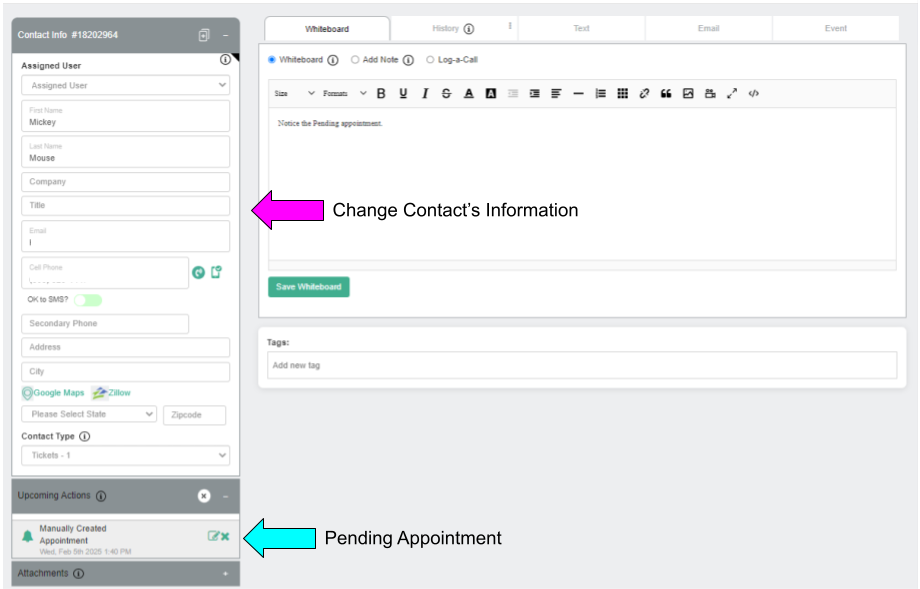
If a User has a pending appointment and the contact’s information: Name, address, phone and or email are edited, then that information is synchronized into the Appointment information.
Email Franchise Estimates Reports
October 28, 2022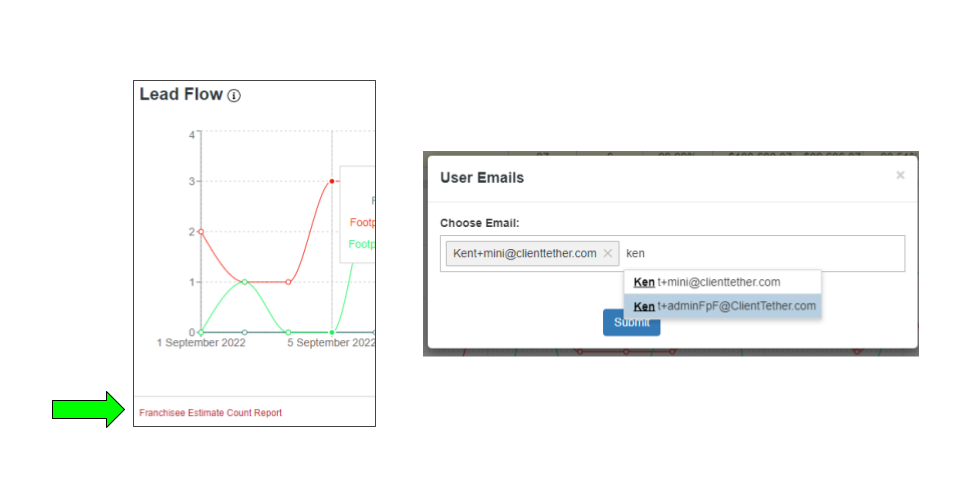
At the bottom of the Lead Flow Dashboard Chart there is a link where Users can click to get the data behind the chart. On click, the system will prompt for email address.
After the report is generated, it will be emailed.